
The Price Action Toolkit EA
The Missing Piece of Functionality in MT4 & MT5!
Fast order buttons to quickly enter, adjust and exit positions and scalp with lightning speed.
Get price action candlestick alerts on the most commonly traded patterns and auto execute entries and exits based on your preferences.

DOWNLOAD THE EA TO USE IN THE STRATEGY TESTER!
Try the EA out in the tester then get your licence for MT4 or MT5.

BUY THE EA & start trading on your live or demo account today!
Fully functional version to use in live or demo trading!
NOTE: MT4 is being phased out gradually so it is recommended to get the MT5 version if your broker supports it to future proof yourself. 😉

Have you seen the EA Bundle!
BUY EVERY EA & SAVE 50%
Get the whole collection of expert advisors
on the platform of your choice!
Get the best trade execution with this EA at

More Information & Purchase Links


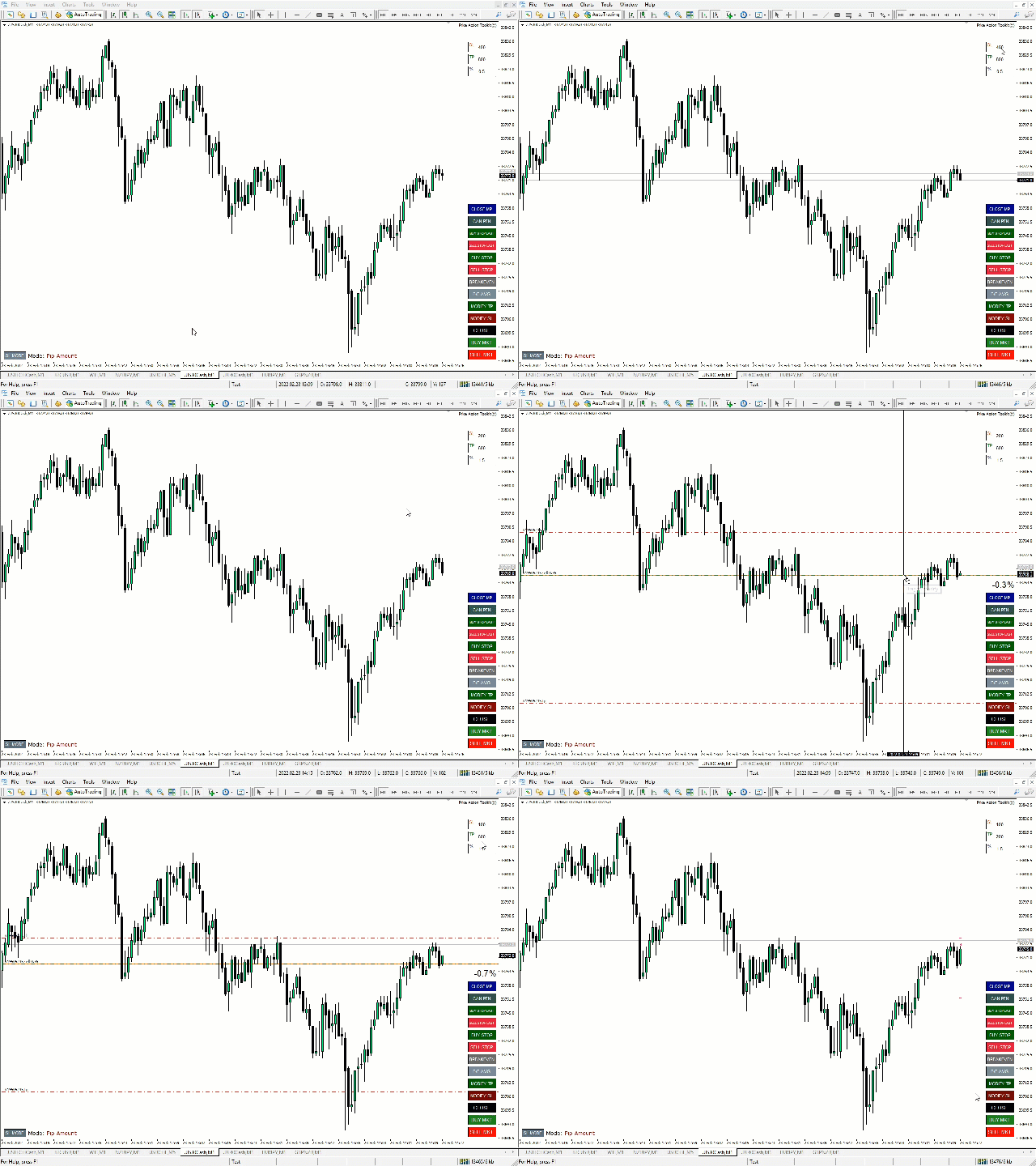
The Price Action Toolkit EA
The price action toolkit EA is primarily designed for scalpers but can be used on all timeframes to quickly enter the market with correctly calculated lot sizing based on your stop level, It allows you to quickly enter trades (instantly or at candle highs and lows with pending orders) and then adjust stops and take profits as the market moves.
Risk Based Entry
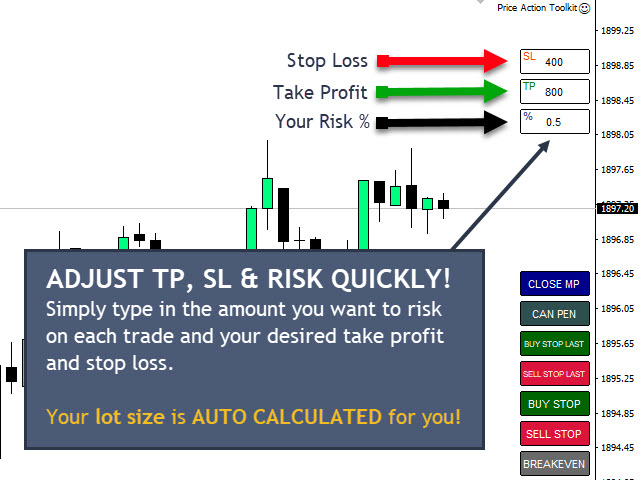
The quick order buttons get you into positions based on a percentage risk of your account. It automatically calculates your lot size based on your risk selected and the distance to your stop loss. As such, you need to make sure your broker allows you to use 0.01 lot sizing, it will not work if you are forced to use 0.10 or 1.00 lot increments.
Fast Trade Execution Buttons
It places quick trade execution buttons on your chart which will automatically open, close or adjust trades instantly. As well as the normal entry buttons you have a fast close button to exit all positions, move your stop to breakeven (or your average breakeven if you have more than one trade open), place buy and sell stops above the current or last candles high and low and also the ability to close out only your most profitable position, so you can take a partial profit on positions you scale into with multiple trades as they start to work for you.
The stop loss mode button allows you to quickly change your stop strategy for each trade. You can toggle between placing your stops at a set number of points (conservative) or at the current or last candles high/low (aggressive).
Candlestick Pattern Recognition
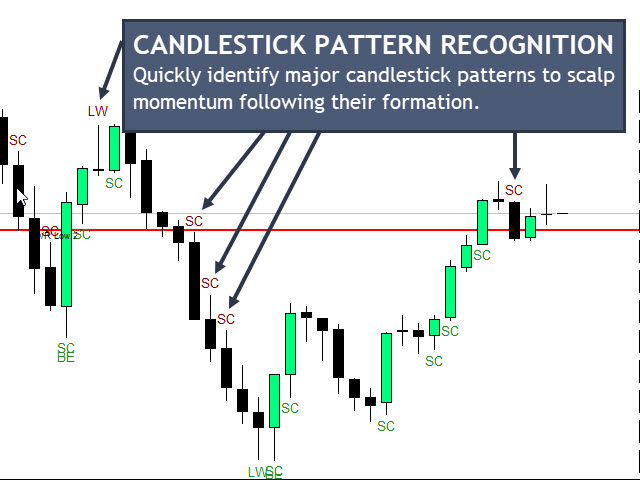
The EA shows on the chart when the most commonly used scalping candlestick patterns are detected including hammers and shooting stars (long wick candles), bullish and bearish engulfing patterns, strong close candles, equal highs and lows, inventory retracement bars (IRBs) and 2 inside bar patterns.
There is also an EMA (exponential moving average) filter for the patterns to filter out only long or short patterns based on trend.
Session Opening Ranges & Recent Ranges
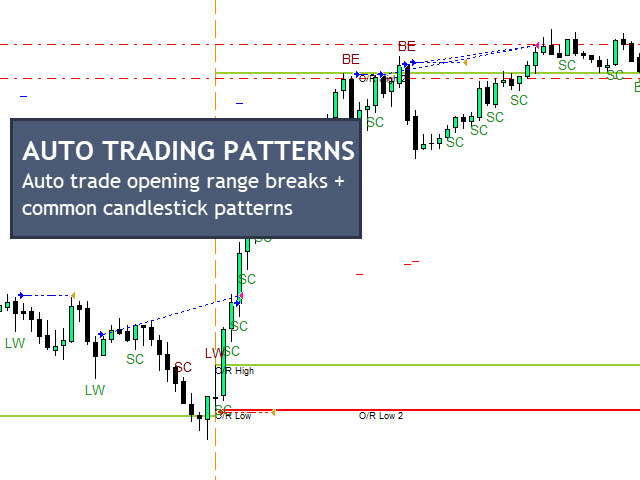
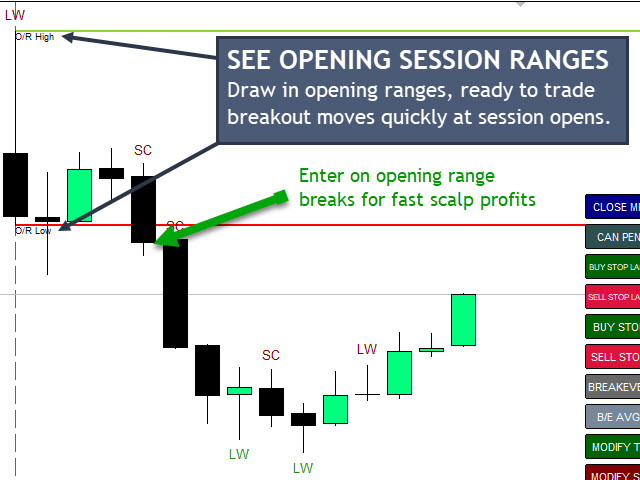
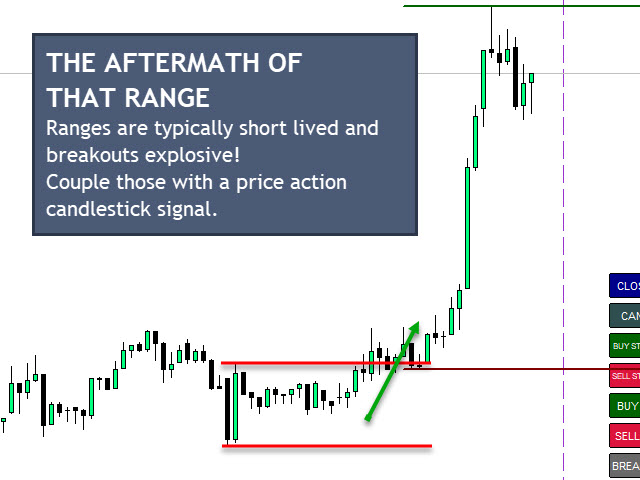
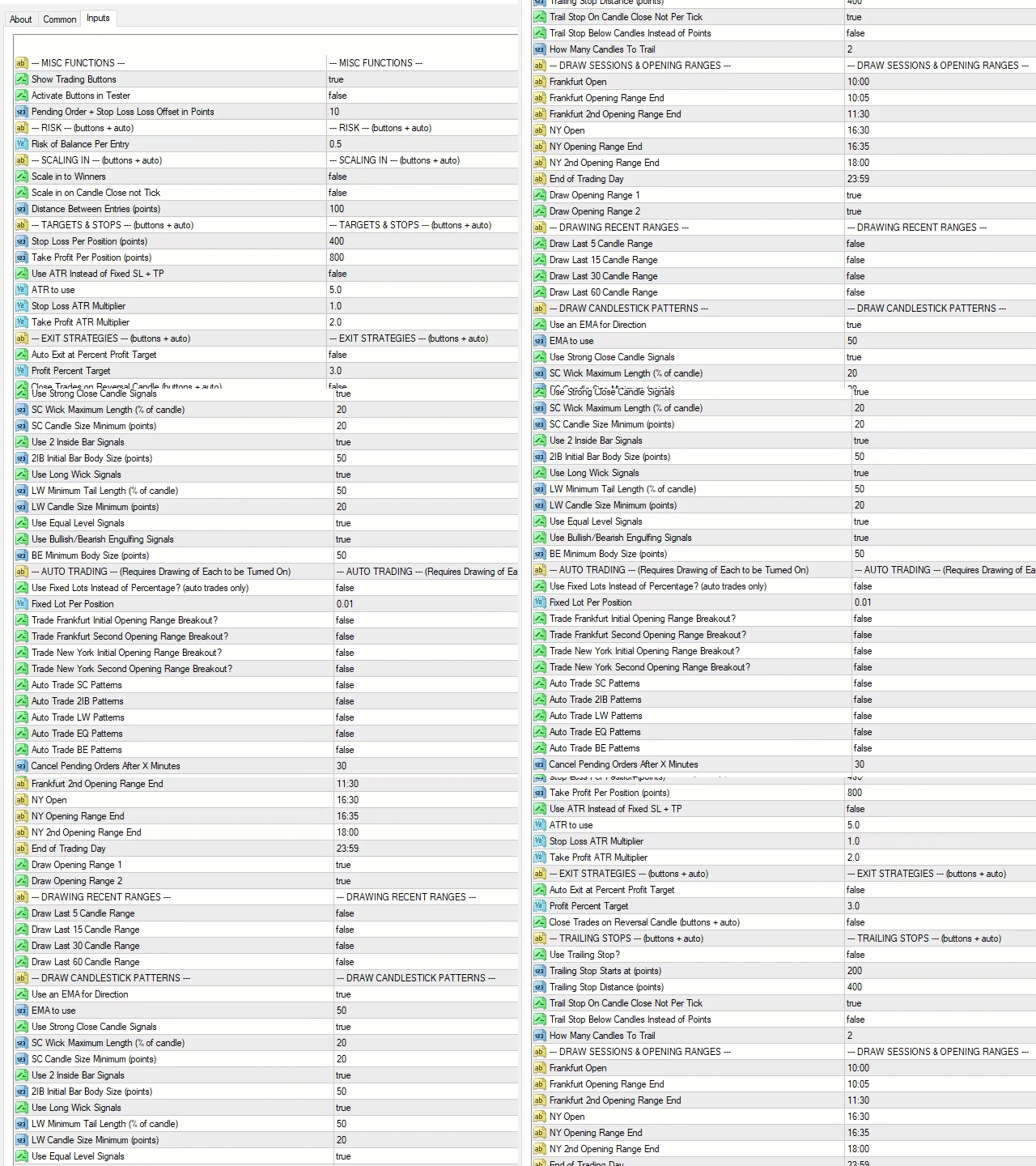
The EA will automatically draw the opening ranges to help spot and trade opening range breakouts at the 2 main trading session starts (Frankfurt and New York). You can choose two opening ranges per session, and also adjust the start and end times of these sessions and the opening ranges you want to identify. The EA comes defaulted to UTC+2 which most brokers use and draws in the opening 5 minutes and 90 minutes, but these can be adjusted as required.
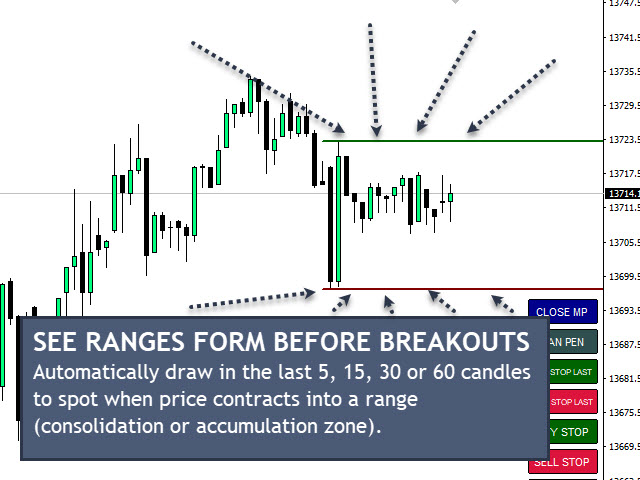
You can also have the last 5, 15, 30 and 60 candles high and low ranges drawn on the chart which adjust as price moves helping you to spot breakouts from recent consolidation periods.
Automated Trading
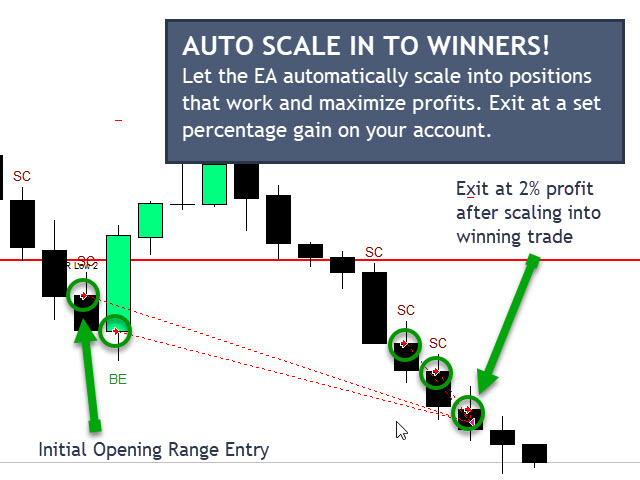
You can set the EA to automatically trade for you based on opening ranges, candlestick patterns, and also it will auto-scale into winning positions for you so you can maximize on your winning entries taking the psychology out of adding to your winners for you which many traders struggle to do. The EA will also auto trail stops to lock in profits on positions that move your way and minimize risks on any trades in profit that may be subject to large, fast moves against you.
Exit Strategies
You can set the EA to auto exit for you based on a percentage account increase for your open trades, which helps you achieve targets automatically. If you are using the automated trading facilities for candlestick pattern recognition and opening ranges, you can also set a daily profit target, which will stop all automated trading when hit. Locking in those profits and preventing over trading of the account, which often results in you giving back a lot of your hard-earned profits!
There is also an option to have the EA exit your positions on signs of a reversal. Then the last candle in your direction is reversed, your positions will close. e.g. If long the EA monitors the low of the last bull candle and when price closed below that level (potential reversal or pullback) it will exit your positions and bank the profit ready for the next entry.
Scalping Practice In The Strategy Tester
The buttons are all available in the strategy tester, so you can practice trading and taking manual and/or semi-automated entries.
DOWNLOAD THE EA TO USE IN THE STRATEGY TESTER!
Try the EA out in the tester then get your licence for MT4 or MT5.
BUY THE EA & start trading on your live or demo account today!
Fully functional version to use in live or demo trading!
Have you seen the EA Bundle!
BUY EVERY EA & SAVE 50%
Get the whole collection of expert advisors
on the platform of your choice!
Get the best trade execution with this EA at


LET'S GET SOCIAL!
Join the Telegram or Discord servers
Get EA set files, strategies, free education and advice!
Get The Indicators & Dashboards I use
The indicators are all available direct from your MT4 or MT5 platform in the market section. Alternatively, you can get them on the MQL5.com website!

The Market Reversal Alert Indicator
The key to the strategy is knowing when price is starting to turn and change direction. This indicator draws in market structure for you, then sends you an alert so you can take a look at your charts and see if there is a valid reason to enter a trade.

The Market Reversal Alert Dashboard
This amazing dashboard monitors the major time frames and all pairs you trade and alerts you instantly when a potential reversal happens. No more staring at charts all day! Every pair and key time frame in front of you in one MT4 window. Priceless.

The ADR Reversal Indicator
The ADR Reversal Indicator shows you at a glance where price is currently trading in relation to its normal average daily range. You will get instant alerts via pop-up, email or push when price exceeds its average range and levels above it of your choosing.

The ADR Alert Dashboard
The ADR reversal dashboard allows you to monitor every pair or instrument you trade in one dashboard. You’ll get alerted every time something exceeds your set ADR levels and ensure you will never miss an opportunity.

The Trade Manager Dashboard
Take control of your forex portfolio. See instantly where you stand, what's working and what's causing you pain! The Trade Manager Dashboard is designed to make risk management and exposure to currencies easier to understand.

The RSI and TDI Alert Dashboard
The RSI / TDI alert dashboard allows you to monitor 6 main timeframes (selectable by you) at once on every major pair you trade. The dashboard will alert you to extended conditions (overbought and oversold) when a candle closes on the chosen time frame.

Symmetrical Triangle Pattern Indicator
Profit from market contraction and consolidation after price makes new highs or lows in the market. Get alerted when a contraction is happening, ready to pounce on the next continuation or reversal move that is building up.

Symmetrical Triangle Pattern Dashboard
Get alerted and see instantly when any instrument you trade forms a symmetrical triangle pattern on any time frame. Get ready to pounce on those triangle breakouts!

Opening Range Breakout EA
Profit from the explosive moves that occur at the open of stock indices and give yourself an actionable edge every day. The opening range breakout EA can be tweaked to your liking to capture the trends that form just after the open every day on the main stock indices like the DAX, DOW, NASDAQ and S&P500.

The Market Reversal Alerts EA
Based on the indicator, this EA will auto trade signals generated from the market reversal alerts indicator. It has powerful filters to configure as you like to trade including ADR, MAs and RSI. You can also use it to basket/grid trade, and it has every risk option you can imagine.
The Price Action Toolkit EA
The missing piece of functionality in MT4!
Fast order buttons to quickly enter, adjust and exit positions and scalp with lightning speed. Get price action candlestick alerts on the most commonly traded patterns and auto execute entries and exits based on your preferences.

Support, Resistance & Propulsion Gaps
Automatically draw support and resistance levels PLUS propulsion candle gaps on your chart, so you can see where price is likely to head next and/or potentially reverse. This indicator is designed to be used as part of the position trading methodology taught on this website and displays key information for targeting and potential entries.

Stock Index Hedge EA
Take advantage of the opening volatility of the major stock indexes and profit from the sudden moves created at those times when the market breaks away at the opening bell. The strategies’ goal is to simply benefit from those days when the market moves fast and hard in one direction at the open and bank that move.